



AppClose: Co-Parent Essentials review
 Analysis by GetAllApps
Co-parenting can turn small decisions into long message threads: which day a child needs a ride, whether a school event changes the handoff, or who is picking up a prescription. AppClose: Co-Parent Essentials is a parenting app built around keeping those shared responsibilities in one place. Its most useful idea is not that it can make a difficult relationship easy, but that a shared plan can reduce the number of details parents have to chase across texts, calendars, and memory.
I see the app as most compelling when two households need a common point of reference. Rather than treating every exchange as a fresh negotiation, the aim is to make the parenting plan the organizing center of day-to-day coordination. That distinction matters: a tool can help clarify logistics, but it cannot make both people communicate thoughtfully or agree on a plan.
A shared plan as the center of co-parenting
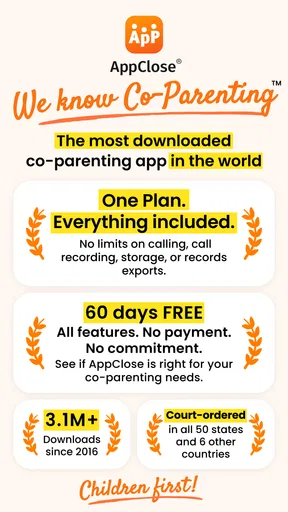
The developer, AppClose, Inc, focuses this free parenting app on co-parenting rather than general family organization. Its store summary emphasizes that everything is included in one plan, with no upsells, and offers a 60-day free period. I would read that as an invitation to try a more centralized workflow, not as a promise that every family will find the same arrangement useful.
The core capability is the idea of bringing co-parenting essentials together around a shared plan. In practical terms, that can give parents a consistent place to check what has been agreed and what needs attention. The benefit is less about a flashy feature and more about reducing uncertainty: when the plan is easy to consult, fewer routine questions have to be reconstructed from scattered conversations.
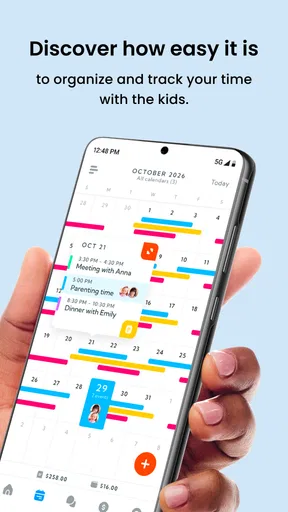
That approach is different from relying on a standard calendar alone. A calendar can show a date, but it may not capture the context that made a change necessary or which parent is responsible for acting on it. AppClose is designed for the narrower, more involved job of coordinating parenting between households. For that reason, it makes more sense as a shared co-parenting workspace than as a replacement for every family app or messaging tool.
The app has an average rating of 4.3 from around 30,000 ratings, and it has passed over a million installs. Those figures suggest that many families have considered it, but they do not tell me whether it will suit a particular communication style. I would judge it by a more personal question: will both parents reliably use one shared plan, or will one person still be left piecing together updates from several places?
Why one shared reference point can help
When arrangements change often, a single shared reference can lower the mental load. A parent preparing for a handoff can check the plan before sending another message, while the other parent can make the same check rather than relying on an old text thread. Even when a conversation is still needed, having the plan in view gives both people a clearer starting point.
There is also a useful boundary in this kind of setup. A shared plan can organize responsibilities, but it does not settle disagreements by itself. If parents differ over what should happen, the app cannot replace a calm discussion or the guidance of a professional. I would use it to keep practical arrangements visible, not as proof that a relationship problem has been solved.
How the plan fits into an ordinary week
Imagine a school event being added to a busy week when the usual handoff is already set. Without a shared system, one parent might send a text, the other might miss it among unrelated messages, and each could remember a different version of the arrangement. With a shared plan at the center, the useful habit is to check the existing schedule first, agree on the change, and then make sure both parents are working from the same updated understanding.
That workflow is valuable because it separates “what is currently planned” from “what we are discussing.” It also encourages a practical routine: look at the plan before making assumptions, raise a change early, and confirm the result in the same shared space. These are small habits, but they can prevent a last-minute scramble when a child is waiting to be picked up.
A less obvious benefit is that the plan can help parents prepare for transitions rather than react to them. Before a handoff, each parent can review the arrangements and identify an unanswered question while there is still time to ask it. This is especially useful when a routine has several moving parts, such as school commitments, activities, and changing availability. The tradeoff is that both adults need to treat the shared plan as current; otherwise, it becomes another place to check without being dependable.
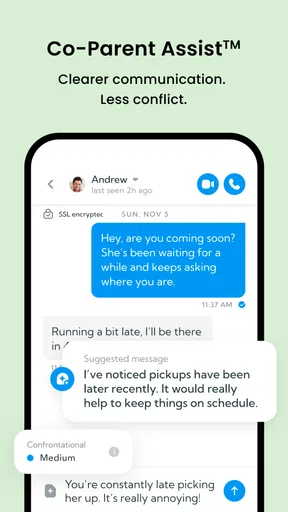
I would also use the app to reduce unnecessary back-and-forth, not to eliminate conversation. If a detail is already clear in the plan, checking it there may be kinder and quicker than sending a message that could sound like a challenge. But if the detail is ambiguous, a direct, neutral question is better than silently interpreting the plan. A shared tool works best when it supports communication instead of becoming a substitute for it.
A practical routine for avoiding confusion
For a new user, I would start by agreeing on how changes will be handled. Decide together what counts as a confirmed adjustment, how soon to raise schedule requests, and where each person should look for the current arrangement. That simple agreement is more important than trying to enter every possible detail at once. It gives the app a clear role and reduces the chance that one parent assumes a discussion has already changed the plan.
Another useful habit is to keep the plan focused on what both parents need to act on. A shared workspace can become hard to use if it is treated as a running archive of every frustration. I would keep logistical information direct and specific, and reserve emotionally charged issues for a more appropriate conversation. This protects the practical value of the plan: when someone checks it under time pressure, the relevant arrangement should be easy to find.
Families should also be realistic about adoption. If one parent prefers phone calls and the other relies on text messages, introducing a new shared system may initially add a step rather than remove one. A short trial period is a good way to see whether both people actually consult it. The app’s free starting period gives families an opportunity to test that routine before deciding whether it fits their needs.
Where the tradeoffs become important
A shared plan is only as useful as the information and cooperation behind it. If updates are delayed, incomplete, or interpreted differently, centralization will not automatically prevent confusion. In a tense co-parenting relationship, one person may also experience a shared tool as another demand to respond or another place where disagreements are visible. That is a real limitation, not a problem an app can fix through design alone.
There is a learning cost as well. Parents who already have a routine that works may not want to move familiar habits into a dedicated app. If a basic shared calendar and a calm conversation are enough, adding another system can feel like needless administration. AppClose is more persuasive when the current arrangement is genuinely scattered or when recurring coordination questions keep creating friction.
Its free status is appealing, though the app includes in-app purchases listed at prices ranging from $8.99 to $98.99 per item. I would check the current purchase details in the app store before committing to any paid option, and distinguish that from the basic trial experience. The summary describes a 60-day free period, so families can use that time to test whether both parents will keep the shared workflow active rather than deciding based on the concept alone.
Privacy and comfort deserve thought, too. Co-parenting information can be personal, and both adults should be comfortable with the way they use a dedicated app before moving important routines into it. I would avoid putting sensitive details into any shared tool unless they are needed for coordination, and I would make sure both parents understand how they intend to use the plan. Clear expectations help prevent the app from becoming a source of new disputes.
The app is free to download and is rated for Everyone. It was released on May 17, 2016, and the current version is 3.4.7.8, with Android support beginning at version 6.0. Those details make it accessible to many Android users, though the practical decision is still whether both households can use it consistently. A compatible device is only the first step; shared commitment is what makes the plan useful.
Who is likely to benefit most
I would recommend considering AppClose when parents need a dedicated place to coordinate recurring responsibilities and are willing to agree on a shared process. It is especially promising for families who find that important arrangements are scattered across message threads, paper notes, and memory. In that situation, one plan can provide a steadier reference and make routine checks less emotionally loaded.
It may be less suitable for parents who already coordinate smoothly with a simple calendar, or for situations where one person will not engage with a shared system. It is also not a shortcut for resolving deep conflict. If the central issue is safety, coercion, or a serious disagreement about parenting arrangements, a general-purpose app should not be treated as a substitute for qualified support or appropriate legal guidance.
Compared with an ordinary calendar, AppClose is aimed at the relationship between co-parents, not just the display of dates. Compared with texting, its plan-first approach can make routine information easier to revisit, but messages remain important when a change needs discussion. The best choice depends on the problem: choose a basic calendar if all you need is a schedule, and consider a co-parenting app when shared organization itself has become difficult.
AppClose has a clear purpose, and I like that its value comes from a practical behavior: checking one shared plan before acting on assumptions. That will not transform every exchange, and it asks both parents to participate, but it can make everyday coordination more deliberate. If you and your co-parent are ready to establish a common routine, the free trial is a sensible way to see whether the app earns a lasting place in your week.
Pros and cons
Pros
- Keeps co-parenting messages organized in one place.
- Shared calendars help parents coordinate schedules.
- Expense tracking supports clearer reimbursement records.
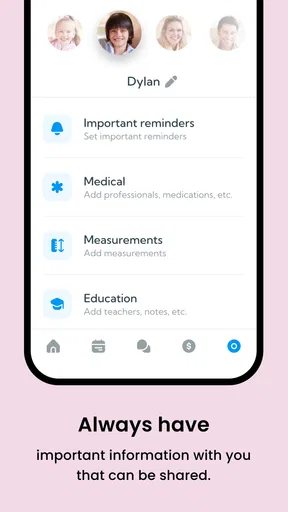
- Parents can share important documents securely.
- Useful for families managing communication across households.
Cons
- Both parents may need to adopt the app for best results.
- Some features may require a paid subscription.
- Notifications can become overwhelming during busy periods.
- The app may not replace formal court-approved communication tools.
- Setup takes time when adding schedules and shared records.


